Troubleshooting
This section summarizes common issues encountered when using AnyShake Explorer and provides corresponding solutions.
Waveform is highly distorted with strong 50/60 Hz mains interference
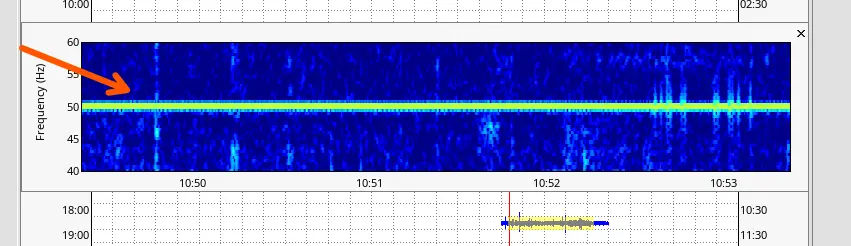
This issue is most commonly caused by power adapters and environmental coupling effects. In particular, 50/60 Hz mains interference can enter the system through electromagnetic coupling, even when the power source itself is clean. To mitigate the problem, we recommend the following approaches:
- Apply Digital Filtering: Configure a low-pass digital filter during the pre-processing stage with a cut-off frequency of 40 Hz. This effectively suppresses mains-frequency interference while preserving seismic signals below 40 Hz.
- Replace the Power Adapter: Some AC–DC adapters may introduce excessive ripple noise and electromagnetic radiation, which can significantly degrade data quality.
- Switch to Battery Power: Powering the system with a 12 V battery eliminates conducted noise from the mains and helps reduce overall interference.
- Change the Deployment Location: 50/60 Hz interference can be coupled into the system through the surrounding electromagnetic environment (e.g., nearby power lines, electrical equipment, or building wiring). In such cases, relocating the instrument to a different site is often the only effective way to reduce this type of interference.
Persistent interference or resonance in a specific frequency band
Geophone sensors are extremely sensitive to vibration. As a result, environmental or structural resonance can have a noticeable impact on the recorded data. Common sources include:
- Structural Resonance: Large glass doors or windows often introduce strong resonance around 2 Hz.
- Improper Installation Location: Deploying the device in high-rise buildings (above ~7 floors) frequently results in dominant resonance near 1 Hz due to building sway.
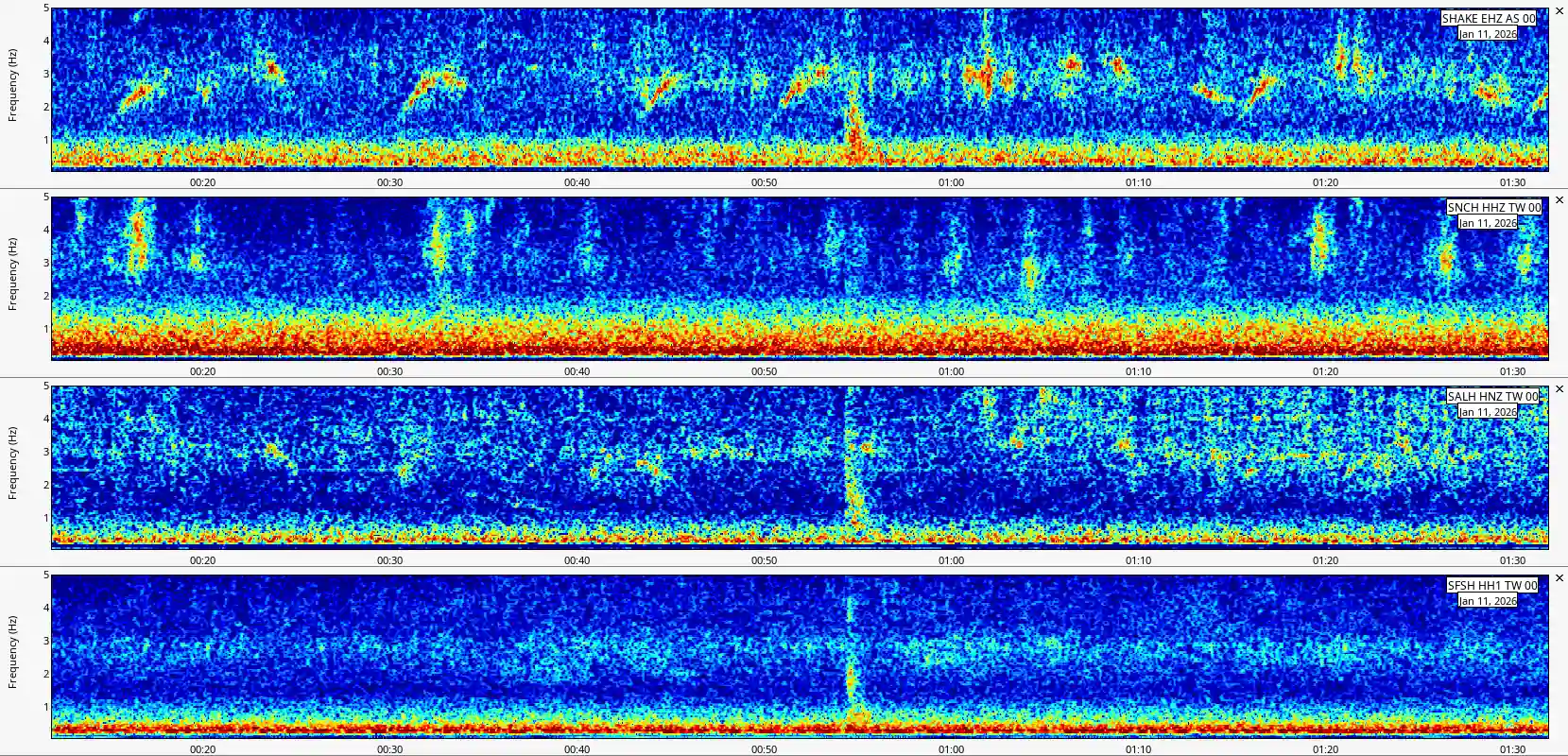
- Island Stations: Stations deployed on islands or coastal rock masses typically exhibit elevated broadband low-frequency noise, caused by continuous ocean wave loading, microseisms, and strong air–sea coupling. This results in an overall higher low-frequency noise floor rather than a single narrow-band resonance.
For example, stations deployed in Taiwan commonly show enhanced energy in the 0.5–1 Hz band, which becomes more pronounced during autumn and winter. This seasonal amplification is consistent with stronger oceanic microseisms driven by intensified monsoon winds and wave activity.
The comparison figure below illustrates this behavior. From top to bottom, the spectra correspond to AnyShake Explorer E-C111G Live Demo, CWASN SNCH Station, CWASN SALH Station, and CWASN SFSH Station, all exhibiting elevated low-frequency noise levels in the same band.
Recommended mitigation strategies are as follows:
- Relocate the Device: Install the instrument on solid ground-level surfaces and avoid proximity to large glass structures or flexible floors.
- Adjust Filter Parameters: If relocation is not possible, apply more aggressive filtering to suppress interference within the affected frequency bands.
One channel shows significantly lower amplitude than the others
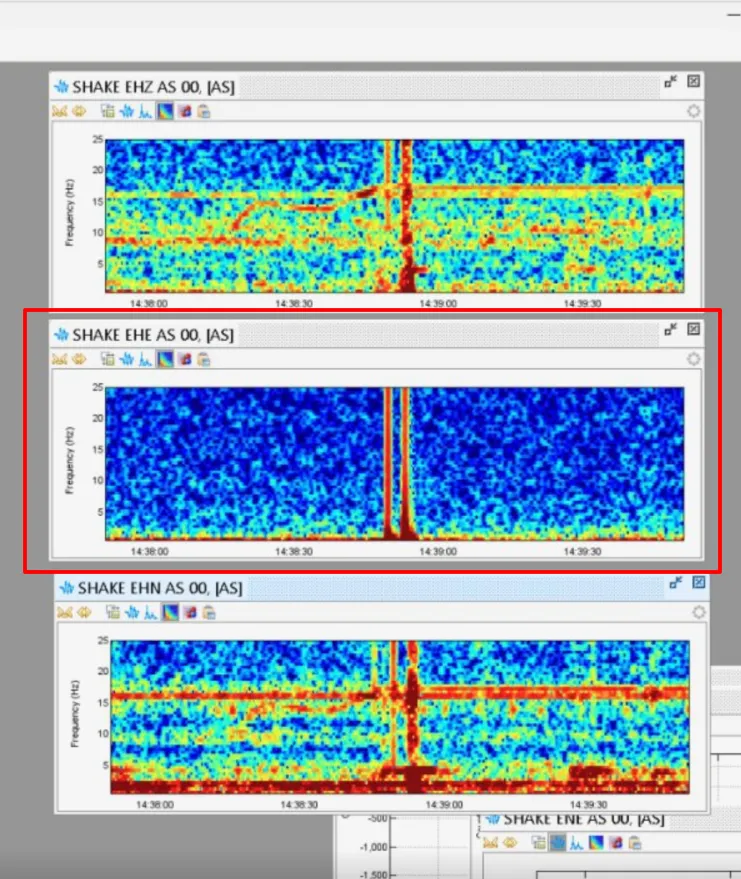
Based on user feedback, this issue is typically caused by either poor electrical contact or a faulty geophone. To identify the root cause, follow the steps below:
-
Rule out contact issues
Swap the wiring terminals between channels and observe whether the abnormal channel returns to normal.- If the channel recovers, the issue is likely due to poor contact (e.g. loose wiring or oxidized terminals).
- If the problem remains on the same channel, the geophone itself is likely defective.
-
Check the geophone condition
If a faulty geophone is suspected, remove it from the device and gently shake it a few times in either the horizontal or vertical direction. Reinstall the geophone and retest.- If the issue is resolved, normal operation can be resumed.
- If the amplitude remains significantly lower, the geophone is likely damaged and should be replaced.
Geophone or accelerometer channel output is not centered around the zero baseline
Baseline drift is commonly caused by temperature variation, operational amplifier offset voltage, and other analog front-end characteristics. The AnyShake Explorer E-C111G outputs raw waveform data without baseline calibration or trend removal. Therefore, it is normal for the signal baseline to be offset from zero, and in most cases this behavior can be safely ignored.
However, for geophone channels, if the baseline offset becomes excessively large and begins to affect signal interpretation or available dynamic range, manual calibration is recommended.